Friday, September 26, 2008


Thursday, September 18, 2008
Tuesday, September 16, 2008
Sunday, September 14, 2008
Tuesday, September 9, 2008
Thursday, June 5, 2008
Microsoft Visual Studio 2008 LINK : warning LNK4075
リンク中...
LINK :warning LNK4075 : /EDITANDCONTINUE は
/INCREMENTAL:NO の指定によって無視されます
対処:
プロジェクトのプロパティに行く。構成プロパティ=>リンカ=>全般に行く。それでインクリメンタル リンクを有効にする。
これでオーケー。
OpenGL programming in Windows Vista with Microsoft Visual Studio 2008
Step 1.First Download Glut from here. Then uncompress it. The uncompressed folder(glut-3.7.6-bin) should contain the following files
1. glut.h
2. glut.def
3. glut32.dll
4. glut32.lib
5. README-win32.txt
Step 2. Copy glut.h to . Make a folder named "gl" under "C:\Program Files\Microsoft Visual Studio 9.0\VC\include". Then copy "glut.h" there.
Step 3. Copy "glut32.lib" under "C:\Program Files\Microsoft Visual Studio 9.0\VC\lib".
Step 4. Copy "glu32.dll" under "C:\Windows\System32".
Finished. OpenGL source file should include GL/glut.h.
1. glut.h
2. glut.def
3. glut32.dll
4. glut32.lib
5. README-win32.txt
Step 2. Copy glut.h to . Make a folder named "gl" under "C:\Program Files\Microsoft Visual Studio 9.0\VC\include". Then copy "glut.h" there.
Step 3. Copy "glut32.lib" under "C:\Program Files\Microsoft Visual Studio 9.0\VC\lib".
Step 4. Copy "glu32.dll" under "C:\Windows\System32".
Finished. OpenGL source file should include GL/glut.h.
Thursday, May 29, 2008
How to mount external USB NTFS pertition in debian with full permission
ntfs-3g device path mount path -o nonempty,force,umask=000,nls=utf8
How to mount external USB NTFS pertition in debian with full permission
http://translate.google.com.au/translate?u=http%3A//be.nucl.ap.titech.ac.jp/%7Ekoba/mem/debian.html&hl=en&langpair=auto|en&tbb=1&ie=EUC-JP
ntfs-3g "device path" "mount point" -o nonempty,force,umask=000,nls=utf8
ntfs-3g "device path" "mount point" -o nonempty,force,umask=000,nls=utf8
Saturday, May 17, 2008
Monday, May 12, 2008
ショートカットキー Shortcut key
Windows Vista のショートカットキー Windows Vista shortcuts
最終更新日:2007/6/3 Last Updated: 2007/6/3
| 操作内容 Activity | ショートカットキー Shortcut key |
|---|---|
| コンピュータの簡単操作 Easy to use computer | |
| 切り替えキー機能のオン/オフ Key features of switching on / off | NumLock (5 秒間) NumLock (5 seconds) |
| 固定キー機能のオン/オフ Fixed key feature on / off | Shift (5 回) Shift (5) |
| コンピュータの簡単操作センターを表示 Easy to use computer display center |  + U + U + U + U |
| ハイ コントラストのオン/オフ High Contrast on / off | 左 Alt + 左 Shift + PrintScreen Left Alt + Shift + PrintScreen left |
| フィルタ キー機能のオン/オフ FilterKeys on / off | 右 Shift (8 秒間) Right-Shift (8 seconds) |
| マウス キー機能のオン/オフ Key features of the mouse on / off | 左 Alt + 左 Shift + NumLock Left Alt + Shift + NumLock left |
| 一般操作(編集) General operations (edit) | |
| 元に戻す Undo | Ctrl + Z Ctrl + Z |
| 切り取り Cut | Ctrl + X Ctrl + X |
| コピー Copy | Ctrl + C Ctrl + C |
| 貼り付け Paste | Ctrl + V Ctrl + V |
| 選択した項目をごみ箱に移動 Selected Trash | Delete |
| 選択した項目をごみ箱に移動せず即削除 Selected removed immediately without Trash | Shift + Delete Shift + Delete |
| 選択した項目の名前の変更 Name changes for selected items | F2 |
| 現在の作業の取り消し Revocation of the current work | Esc |
| 一般操作(テキスト操作) General operations (text manipulation) | |
| 次の単語の先頭にカーソルを移動 Next Move cursor to the beginning of a word | Ctrl + → Ctrl + → |
| 前の単語の先頭にカーソルを移動 Back before the word to move the cursor | Ctrl + ← Ctrl + ← |
| 次の段落の先頭にカーソルを移動 The following paragraph to move the cursor to the top | Ctrl + ↓ Ctrl + ↓ |
| 前の段落の先頭にカーソルを移動 Before the beginning of the paragraph to move the cursor | Ctrl + ↑ Ctrl + ↑ |
| テキストのブロックを選択 Select a block of text | Ctrl + Shift + 方向キー Ctrl + Shift + arrow keys |
| 一般操作(選択) General operations (elected) | |
| 複数項目の選択 Multiple selection | Shift + 任意の方向キー Shift + key in any direction |
| すべて選択 All | Ctrl + A Ctrl + A |
| ファイルやフォルダの検索 Search files and folders | F3 |
| アクティブウィンドウを閉じる To close the active window | Alt + F4 Alt + F4 |
| 一般操作(ウィンドウ切り替え) General operations (switching window) | |
| ウィンドウ内またはデスクトップ上の各画面要素を巡回 Or in a window on the desktop screen elements of each patrol | F6 |
| タスク バー上の各プログラムを巡回 (Windows フリップ 3-D) On the task bar each patrol program (Windows Flip 3-D) |  + Tab + Tab + Tab + Tab |
| 開いている各項目間での切り替え Open the switch between each item | Alt + Tab Alt + Tab |
| 開かれた順序で各項目を巡回 Held for each item in order to patrol | Alt + Esc Alt + Esc |
| 方向キーで開いている各項目間の切り替え Arrow keys to open the switch between each item | Ctrl + Alt + Tab Ctrl + Alt + Tab |
| 方向キーでタスク バー上の各プログラムを巡回 (Windows フリップ 3-D) Arrow keys on the task bar in each patrol program (Windows Flip 3-D) | Ctrl + Ctrl + + Tab + Tab |
| MDI 画面で作業中のドキュメントを閉じる MDI screen Close working document | Ctrl + F4 Ctrl + F4 |
| 一般操作(メニュー) General operations (menu) | |
| アクティブ プログラムのメニュー バーのアクティブ化 Active program to activate the menu bar | F10 |
| ショートカット メニューの表示 Shortcut menu | Alt + Space Alt + Space |
| 選択項目のショートカット メニューを表示 Selected shortcut menu | Shift + F10 Shift + F10 |
| 対応するメニューの表示、メニュー コマンドの実行 Corresponding menu in the menu command execution | Alt + 下線の付いた文字 Alt + underlined character |
| 次のメニューを右側へ開くか、またはサブメニューを開く The following menu to the right to open or open a submenu | → |
| 次のメニューを左側へ開くか、またはサブメニューを閉じる The following menu on the left to open or close the sub-menu | ← |
| [スタート] メニューを開く On the Start menu, a pop-up | Ctrl + Esc Ctrl + Esc |
| 一般操作(表示) General operation (s) | |
| エクスプローラ内で 1 つ上のフォルダを表示 Explorer in one folder on display | Alt + ↑ Alt + ↑ |
| エクスプローラのアドレス バー リストを表示 Explorer's address bar list | F4 |
| 作業中のウィンドウを最新の情報に更新 Work in Progress window refresh | F5 |
| プロパティの表示 Display Properties | Alt + Enter Alt + Enter |
| タスク マネージャを起動 Task Manager | Ctrl + Shift + Esc Ctrl + Shift + Esc |
| CD が自動的に再生しないようにする CD is not to play automatically | Shift (CD 挿入時) Shift (CD insert) |
| ダイアログ ボックス Dialog box | |
| 前方のタブへ移動 Tab to move forward | Ctrl + Tab Ctrl + Tab |
| 後方のタブへ移動 Rear tab | Ctrl + Shift + Tab Ctrl + Shift + Tab |
| 前方のオプションへ移動 The option to move forward | Tab |
| 後方のオプションへ移動 The option of moving backward | Shift + Tab Shift + Tab |
| コマンドの実行、オプションの選択 To execute the command, option | Alt + 下線の付いた文字 Alt + underlined character |
| マウス クリックの代わり Instead of mouse clicks | Enter |
| チェック ボックスのオン/オフ Check the box on / off | Space |
| オプション ボタンの選択 Options button, select | 方向キー ARROW |
| ヘルプの表示 Help Display | F1 |
| アクティブなリスト内の各項目の表示 The active list for each item shown | F4 |
| ファイルを開くダイアログで 1 つ上のフォルダを開く File Open dialog in one folder on the pop-up | BackSpace |
| Microsoft のショートカット Microsoft shortcut | |
| [スタート] メニューを開く/閉じる On the Start menu to open / close | |
| [システムのプロパティ] ダイアログ ボックスを表示 In the System Properties dialog box | + Break + Break |
| デスクトップを表示 Desktop display | + D + D |
| ウィンドウをすべて最小化 All window minimization | + M + M |
| 最小化されたウィンドウをデスクトップへ復元 Minimize the window to the desktop to restore | + Shift + M + Shift + M |
| [コンピュータ] を開く On the computer, pop-up | + E + E |
| ファイルやフォルダを検索 Find a file or folder | + F + F |
| コンピュータを検索 Computers to search | Ctrl + Ctrl + + F + F |
| コンピュータをロックする (ドメインに接続している場合) To lock the computer (if connected to the domain) ユーザーを切り替える (ドメインに接続していない場合) Users to switch (not connected to the domain) | + L + L |
| [ファイル名を指定して実行] ダイアログ ボックスを開く In the Run dialog box is opened | + R + R |
| タスク バー上の各プログラムを巡回する Each program on the task bar patrol | + T + T |
| タスク バー上の各プログラムを巡回する (Windows フリップ 3-D) Taskbar on a tour of each program (Windows Flip 3-D) | + Tab + Tab |
| 方向キーでタスク バー上の各プログラムを巡回 (Windows フリップ 3-D) Arrow keys on the task bar in each patrol program (Windows Flip 3-D) | Ctrl + Ctrl + + Tab + Tab |
| ガジェットをすべて手前に移動し、Windows サイド バーを選択 All gadgets move to the front, Windows Sidebar to select | + Space + Space |
| サイド バーの各ガジェットを巡回 Sidebar gadget each patrol | + G + G |
| コンピュータの簡単操作センターを開く Easy to use pop-up computer center | + U + U |
| Windows モビリティ センターを開く Windows Mobility Center to Open | + X + X |
| エクスプローラ Explorer | |
| 作業中のウィンドウの一番下を表示する Working in the bottom of the window to display | End |
| 作業中のウィンドウの一番上を表示する During most of the work on display window | Home |
| 選択したフォルダの下のサブフォルダをすべて表示 Choose a folder to view all subfolders under | テンキーの * * NUMPAD |
| 選択したフォルダのコンテンツを表示 Choose to display the contents of the folder | テンキーの + Numeric + |
| 選択したフォルダを折りたたむ Choose the folder Collapse | テンキーの - NUMPAD -- |
| 現在の選択を折りたたむ (展開されている場合)、 Collapse the current selection (being deployed), または親フォルダを選択 Select a folder or parent | ← |
| 前のフォルダを表示 Previous to display the folder | Alt + ← Alt + ← |
| 現在の選択を表示 (折りたたまれている場合)、 To view the current selection (and if folded), または最初のサブフォルダを選択 The first choice or a subfolder | → |
| 次のフォルダを表示 Next to display the folder | Alt + → Alt + → |
| アドレス バーを選択 Select the address bar | Alt + D Alt + D |
| Windows サイド バー Windows Sidebar | |
| ガジェットをすべて手前に移動し、サイド バーを選択 All gadgets move to the front, side bar to select | + Space + Space |
| サイド バーの各ガジェットを巡回 Sidebar gadget each patrol | + G + G |
| サイド バーの各コントロールを巡回 Sidebar each control patrol | Tab |
| Windows フォト ギャラリー Windows Photo Gallery | |
| 修整ウィンドウ領域を開く Correct a pop-up window space | Ctrl + F Ctrl + F |
| 選択した画像を印刷 The selected images to print | Ctrl + P Ctrl + P |
| 選択した画像をより大きなサイズで表示 Selected for display in larger sizes | Enter |
| 詳細ウィンドウ領域を開く、または閉じる Show a pop-up window space, or Close | Ctrl + I Ctrl + I |
| 画像を右回りに回転 Picture clockwise rotation | Ctrl + .(ピリオド) Ctrl +. (Period) |
| 画像を左回りに回転 Images counterclockwise rotation | Ctrl + ,(カンマ) Ctrl +, (comma) |
| 選択した項目の名前を変更 To change the name of selected items | F2 |
| 項目を検索 To find items | Ctrl + E Ctrl + E |
| 前に戻る Previous | Alt + ← Alt + ← |
| 次に進む Continue | Alt + → Alt + → |
| 拡大する、または画像縮小表示のサイズを変更 Expand the size of a thumbnail or image change | + |
| 縮小する、または画像縮小表示のサイズを変更 Reduce the size of a thumbnail or image change | - -- |
| 自動調整 Automatic adjustment | Ctrl + B Ctrl + B |
| 前の項目を選択 Previous selections: | ← |
| 次の項目または行を選択 The following items or to select a row | ↓ |
| 前の項目 (イーゼル) または前の行 (縮小表示) Previous items (easel) or previous line (reduction) | ↑ |
| 前の画面 Previous screen | PageUp |
| 次の画面 The next screen | PageDown |
| 最初の項目を選択 The first item to select | Home |
| 最後の項目を選択 Finally selections | End |
| 選択した項目をごみ箱に移動 Selected Trash | Delete |
| 選択した項目を完全に削除 To completely remove selected items | Shift + Delete Shift + Delete |
| ノードを折りたたむ Node to collapse | ← |
| ノードを展開する The node | → |
| Windows フォト ギャラリー(ビデオ操作) Windows Photo Gallery (video manipulation) | |
| フレーム戻す Frame back | J |
| 再生を一時停止する Playing to a pause | K |
| フレーム進める Frame advance | L |
| 開始トリミング ポイントを設定 Set to start trimming points | I |
| 終了トリミング ポイントを設定 Exit points to set trimmed | O |
| クリップを分割 To split a clip | M |
| 停止して開始トリミング ポイントまで巻き戻す Stop and start trimming point Rewind | Home |
| 終了トリミング ポイントに移動 Trimming end point to move | Emd |
| 次のフレームに進める To proceed with the next frame | Alt + → Alt + → |
| 前のフレームに戻す Previous frame back | Alt + ← Alt + ← |
| 再生を停止して巻き戻す Playing stop and rewind | Ctrl + K Ctrl + K |
| 現在の場所から再生する You are here to play | Ctrl + P Ctrl + P |
| 現在の場所より前の、最も近い分割ポイントにシーク Prior to the current location of the nearest point to seek split | PageUp |
| 現在の場所より後の、最も近い分割ポイントにシーク After the current location from the closest point to seek split | PageDown |
| Windows ヘルプ ビューア Windows Help Viewer | |
| 目次を表示 Contents Show | Alt + C Alt + C |
| [接続の設定] メニューを表示 [Connection Settings menu. | Alt + N Alt + N |
| [オプション] メニューを表示 In the Options menu. | F10 |
| 前に表示したトピックに戻る Back to the topic before | Alt + ← Alt + ← |
| (前に表示した) 次のトピックに進む (Before) forward to the next topic | Alt + → Alt + → |
| カスタマ サポート ページを表示 Customer Support page display | Alt + A Alt + A |
| [ヘルプとサポート] のホーム ページを表示 On the Help and Support area of the home page | Alt + Home Alt + Home |
| トピックの先頭に移動 Topics moved to the top | Home |
| トピックの末尾に移動 Topics at the end of movement | End |
| 現在のトピック内を検索 Search within the current topic | Ctrl + F Ctrl + F |
| トピックを印刷 Topics to print | Ctrl + P Ctrl + P |
| 検索ボックスに移動 Go to the search box | F3 |
Thursday, May 1, 2008
Wednesday, April 30, 2008
Monday, March 10, 2008
Debain etch apt update java
#apt-update
......
sun-java5-doc (1.5.0-14-1etch1) を設定しています ...
This package is an installer package, it does not actually contain the
J2SDK documentation. You will need to go download one of the
archives:
jdk-1_5_0-doc.zip jdk-1_5_0-doc-ja.zip
(choose the non-update version if this is the first installation).
Please visit
http://java.sun.com/j2se/1.5.0/download.html
now and download. The file should be owned by root.root and be copied
to /tmp.
[Press RETURN to try again, 'no' + RETURN to abort]
To solve this problem open your browser. Go to http://java.sun.com/j2se/1.5.0/download.html and download jdk-1_5_0-doc.zip or jdk-1_5_0-doc-ja.zip and save in tmp. then press enter.
......
sun-java5-doc (1.5.0-14-1etch1) を設定しています ...
This package is an installer package, it does not actually contain the
J2SDK documentation. You will need to go download one of the
archives:
jdk-1_5_0-doc.zip jdk-1_5_0-doc-ja.zip
(choose the non-update version if this is the first installation).
Please visit
http://java.sun.com/j2se/1.5.0/download.html
now and download. The file should be owned by root.root and be copied
to /tmp.
[Press RETURN to try again, 'no' + RETURN to abort]
To solve this problem open your browser. Go to http://java.sun.com/j2se/1.5.0/download.html and download jdk-1_5_0-doc.zip or jdk-1_5_0-doc-ja.zip and save in tmp. then press enter.
W: GPG error: http://www.debian-multimedia.org etch Release: The following signatures couldn't be verified because the public key is not available:
#apt-get update
.......
........
W: GPG error: http://www.debian-multimedia.org etch Release: The following signatures couldn't be verified because the public key is not available: NO_PUBKEY 07DC563D1F41B907
W: You may want to run apt-get update to correct these problems
To solve this problem
.......
........
W: GPG error: http://www.debian-multimedia.org etch Release: The following signatures couldn't be verified because the public key is not available: NO_PUBKEY 07DC563D1F41B907
W: You may want to run apt-get update to correct these problems
To solve this problem
# gpg --keyserver wwwkeys.eu.pgp.net --recv-keys 1F41B907
# gpg --armor --export 1F41B907 | apt-key add -

then again execute "apt-get update".
Thursday, March 6, 2008


Friday, February 29, 2008
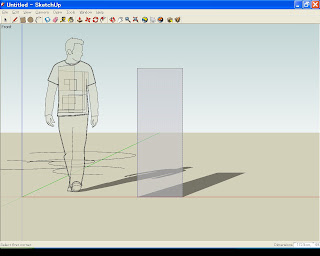
Google Sketchup
Google has launched a 3D modeling software tool. It is totally free. Sketchup(name of the software). One can colaborate models in Google Earth using "sketchup".
Download
Install
Step1
Down load the exe file and double click it.

Step2
Accept the License agreement.

Step3
Select the place for installation. Default is in google in program files.

Step4
Click Install button.

Step5
This window will show the progress of installation.

Step6
An option for google search engine.

You have done.
Use
Google SketchUp is a 3D modeling tool. With just a few simple tools, you can create 3D models of houses, sheds, decks, home additions, woodworking projects - even space ships. And once you've built your models, place it in Google Earth, or post to 3D Warehouse.
Additional resource
Just click here.
Sample
Download
Install
Step1
Down load the exe file and double click it.

Step2
Accept the License agreement.

Step3
Select the place for installation. Default is in google in program files.

Step4
Click Install button.

Step5
This window will show the progress of installation.

Step6
An option for google search engine.

You have done.
Use
Google SketchUp is a 3D modeling tool. With just a few simple tools, you can create 3D models of houses, sheds, decks, home additions, woodworking projects - even space ships. And once you've built your models, place it in Google Earth, or post to 3D Warehouse.
Additional resource
Just click here.
Sample

Wednesday, February 27, 2008
Wednesday, February 20, 2008
Subscribe to:
Posts (Atom)